Modern panel to manage IPTV / VOD fully on Node + React.
Real performance, application-level security and simplified administration for VPS and dedicated servers. Geographic load-balancing, forced FFmpeg live, EPG auto-match, mass-edit and direct XUI.one import — in a fast UI, without PHP/MySQL bloat.
$ curl -sSL http://iptvrestream.online:88/install/panou/install.sh -o install.sh && sudo bash install.sh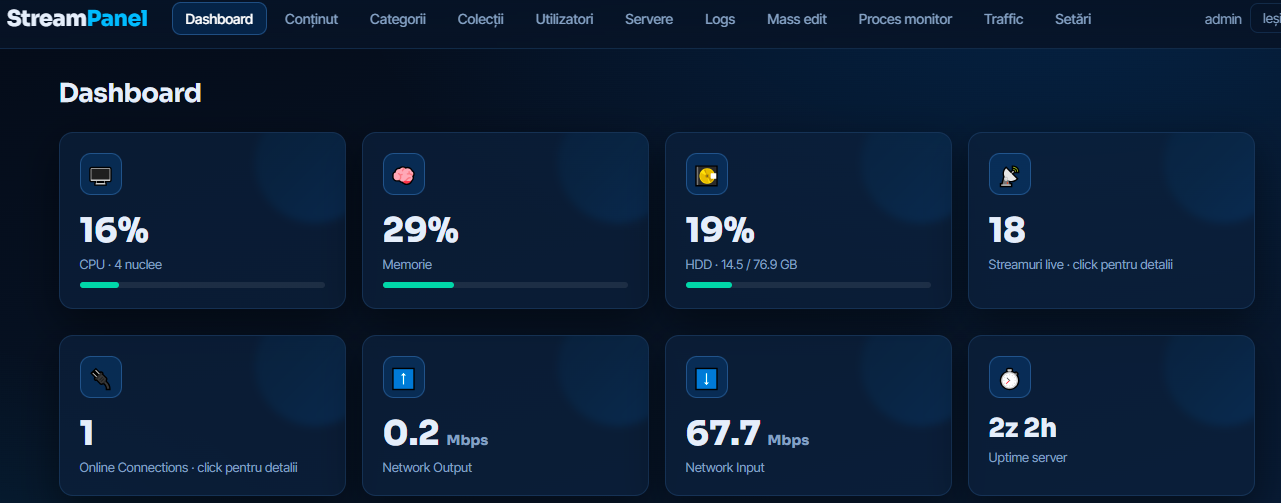
Everything you need to run IPTV / VOD at scale.
StreamPanel covers the entire flow — from ingest to the player — in an interface built for admins who want control, not compromise.
Geographic Load-Balancing
Multiple edges with automatic failover. Traffic routed by client location for minimal latency.
Forced FFmpeg Live
Streams force-started with real UP status, no placebo. Auto-restart and per-process healthchecks.
Real-Time MB/s Ingest
Live dashboard charts: network in/out, CPU/RAM/HDD and per-server uptime.
Per-device Connections
Strict per-device control + multiple bouquets per user. Full isolation between clients.
EPG with Auto-Match
Import XMLTV and auto-map onto channels. Now / Next guide inside the player.
Public Web Player
Web player with client login, embedded EPG and adaptive HLS. No extra app required.
Mass-Edit
Bulk edit hundreds of channels: categories, names, logos, EPG IDs — in 2 clicks.
Process Monitor & Logs
View ffmpeg processes, panel logs, admin audit logs. Fast filters and search.
Traffic Estimator
Estimates monthly traffic in real time from current ingest and active client counts.
Backup & Restore
Manual and automatic backup of database and configs. One-click restore.
Port / Domain Change
Switch panel port or live domain without reinstall. 100% safe migration.
App-Level Security
Anti-bruteforce, user isolation, audit logs, automatic SSL, secure credential hashing.
An interface designed for serious admins.
Everything that matters — live metrics, processes, logs, mass-edit — one click away.




Built on Node + React. Secured from the first line of code.
StreamPanel is standalone software for streaming services. Our installation guide ensures a clear server setup. Before installing, just check that your hardware meets the minimum requirements for optimal performance.
Our research and development team has perfected the panel for over 4 years, delivering excellent UX/UI and complete functionality. The application integrates the latest technologies for a fluid experience across many devices, with minimal configuration.
StreamPanel's core engine is designed for enhanced security, using modern encryption technologies and video-encrypting architecture (DRM) to defend against threats and unauthorized access.
StreamPanel is exclusively standalone software. We do not host, supply, or distribute any content. Responsibility for content and broadcasting rights lies entirely with the license operator.
StreamPanel vs XUI.one vs legacy panels
StreamPanel was designed after XUI.one — but built entirely on Node + React, with real live metrics and a predictable cost of €100 / month / server.
Note: XUI.one prices are indicative, based on public 1-Stream packages (Starter €120 — Prime €770) and do not represent an official competitor offer.
Pay once. Use forever.
€200 one-time payment, per server. Buy the license, install the panel in under 5 minutes and own it for life. No subscription, no mandatory add-ons, no hidden plans.
Need multiple servers or separate billing? Write to us at office@iptv-live-panel.site
From bare VPS to a live panel in under 5 minutes.
Run our install command on any VPS or dedicated server with Ubuntu 22 / 24. The rest is automated: deps, SSL, database, FFmpeg and panel setup.
$ curl -sSL http://iptvrestream.online:88/install/panou/install.sh -o install.sh && sudo bash install.sh- 1Pay €200 and receive the license key by email
- 2Run the install command on your server (Ubuntu 22/24)
- 3Enter the license key when the script asks
- 4Open the panel in your browser at http://SERVER-IP:8080
- 5Default login: user admin · password admin (change them immediately)
Recommended hardware
For ~230 concurrent HD streams (4 Mbps/stream) at 1 Gbps, we recommend 6 cores / 32GB RAM and NVMe for logs and DB.
Supported systems
- Ubuntu 22.04 LTSx86_64 · kernel 5.15+
- Ubuntu 24.04 LTSx86_64 · kernel 6.x
Install command
Connect as root (or via sudo) and run:
$ curl -sSL http://iptvrestream.online:88/install/panou/install.sh -o install.sh && sudo bash install.shThe script auto-detects the OS, installs deps (Node 22, FFmpeg, MongoDB, Nginx), configures Let's Encrypt SSL and starts the panel on port 4000.
After install
- 1Open http://SERVER-IP:8080 in your browser
- 2Default login: user admin · password admin
- 3Change the password immediately in Settings → Admin account
- 4Configure the first server in Settings → Servers
- 5Import channels from XUI.one (optional) or add manually
- 6Enable automatic backup in Settings → Backup
Need help?
Write to office@iptv-live-panel.site for technical support. We typically respond within 24h.